Pinterest is one of the most underrated platforms for driving organic traffic. Millions of bloggers, e-commerce sellers, and content creators rely on it daily – yet most of them are flying blind. Pinterest hides detailed engagement metrics behind its native analytics, making it nearly impossible to understand which pins actually perform well and why.
That’s where specialized tools come in. After testing dozens of Pinterest extensions and generators over the past year, I stumbled upon a toolkit that genuinely stands out – InsightPins (insightpins.com). It bundles two essential tools under one roof: a Chrome extension for in-depth pin analytics and sorting, and a free online pin generator. In this review, I’ll walk through both tools and explain why they deserve a spot in every Pinterest marketer’s workflow.
Why Pinterest Analytics Matters More Than You Think
If you’re serious about Pinterest marketing, you already know that not all pins are created equal. Some get thousands of saves and clicks, while others disappear into the void. The problem is that Pinterest’s built-in analytics only shows you data for your own account – and even then, the metrics are limited. You can’t easily compare pins across niches, sort them by engagement, or spot trends in real time.
Third-party analytics tools fill this gap by revealing hidden data that Pinterest doesn’t display by default. Metrics like individual pin saves, comments, likes, and creation dates become visible, allowing you to make smarter content decisions. Think of it as going from guesswork to a data-driven strategy.
Pinterest Pin Stats – Sort Pins: The Chrome Extension That Reveals Hidden Data
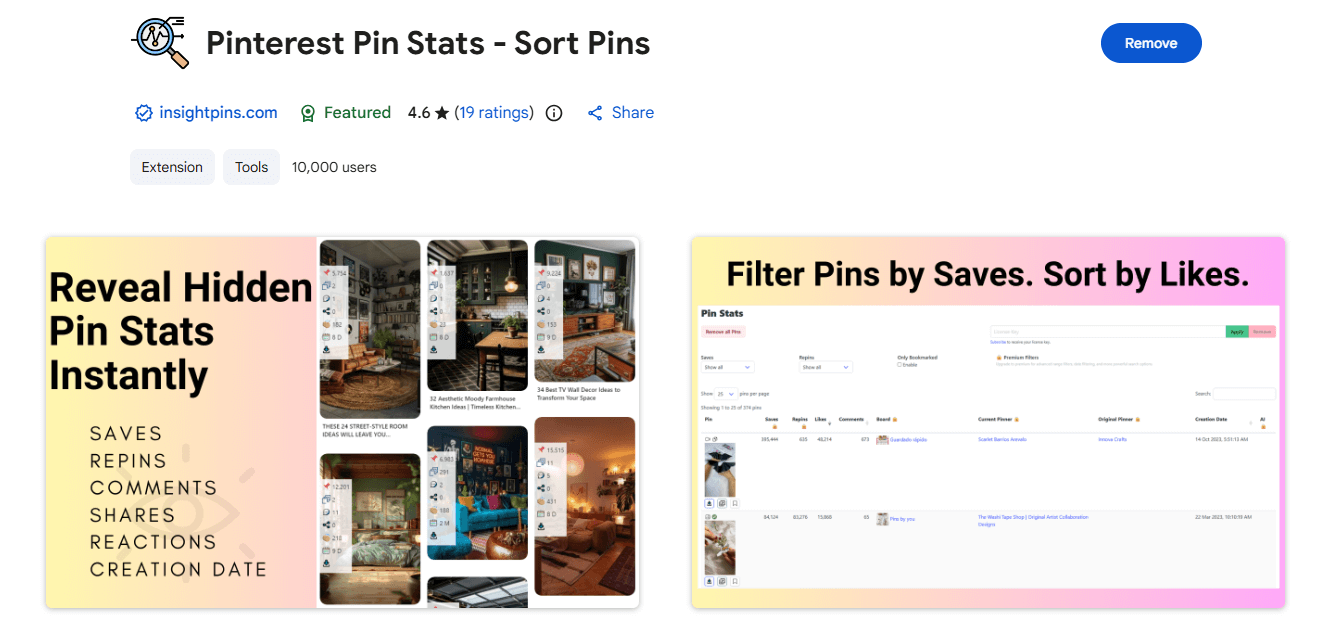
The core product from InsightPins is their Chrome extension called Pinterest Pin Stats – Sort Pins. It’s available for free in the Chrome Web Store and has already crossed 10,000 active users with a solid 4.6-star rating.
What Does It Actually Do?
Once installed, the extension overlays engagement stats directly on every pin you see while browsing Pinterest. That means you don’t need to click into individual pins one by one – saves, likes, comments, and creation dates appear right on the feed. This alone saves an enormous amount of time for anyone doing competitor research or content planning.
Key Features at a Glance
Hidden Stats Display. View engagement metrics – saves, likes, shares, comments, and creation dates – directly on each pin while you browse your home feed, search results, or any board. This is the data Pinterest normally keeps tucked away.
Advanced Sorting and Filtering. Open the dedicated Pin Stats Table and sort your collected pins by any metric. Want to find the most-saved pins in a niche? Sort by saves. Looking for fresh content? Sort by date. The Pro version adds even more filters – by minimum/maximum saves, likes, comments, date ranges, and pin type.
Pinterest Ads Analysis. The extension also identifies promoted pins, giving you insights into what competitors are spending money to advertise. Understanding paid strategies in your niche can inform both your organic and paid approach.
High-Quality Media Downloads. Save images and videos from Pinterest in their original resolution. This is useful for mood boards, design reference, and content inspiration – all while respecting Pinterest’s terms of use.
Local Data Storage. All pin data is stored locally in your browser. No data is sent to external servers (except for encrypted license validation), which is a significant privacy advantage over some competing tools.
CSV Export. Pro users can export their pin data to spreadsheets for deeper analysis, reporting, or sharing with clients and team members.
Free vs. Pro: What Do You Get?
The free version is surprisingly generous. You get hidden stats display, basic sorting by repins, likes, comments, and creation date, plus high-quality media downloads. The Pro version unlocks advanced filters, additional sort options (by saves, board, pinner), CSV/XLS export, custom column visibility, and priority support.
Pricing is straightforward: $6/month, $21/year ($1.75/month), or a $45 one-time lifetime payment. Each license covers up to 3 devices, and there’s a 14-day money-back guarantee. Compared to other Pinterest tools that charge $15-50/month, the lifetime deal is a standout value.
How It Compares to Alternatives
I tested several competing extensions – SortPin, PinSort Pro, Pinterest Extra – and InsightPins consistently came out ahead in two areas: data accuracy and interface cleanliness. Some alternatives clutter the Pinterest feed with oversized buttons, while others show inaccurate creation dates. The InsightPins extension maintains a clean overlay that doesn’t interfere with normal browsing, and its stats closely match what I verified through Pinterest’s own API.
Free Pinterest Pin Generator: Create Stunning Pins in Seconds
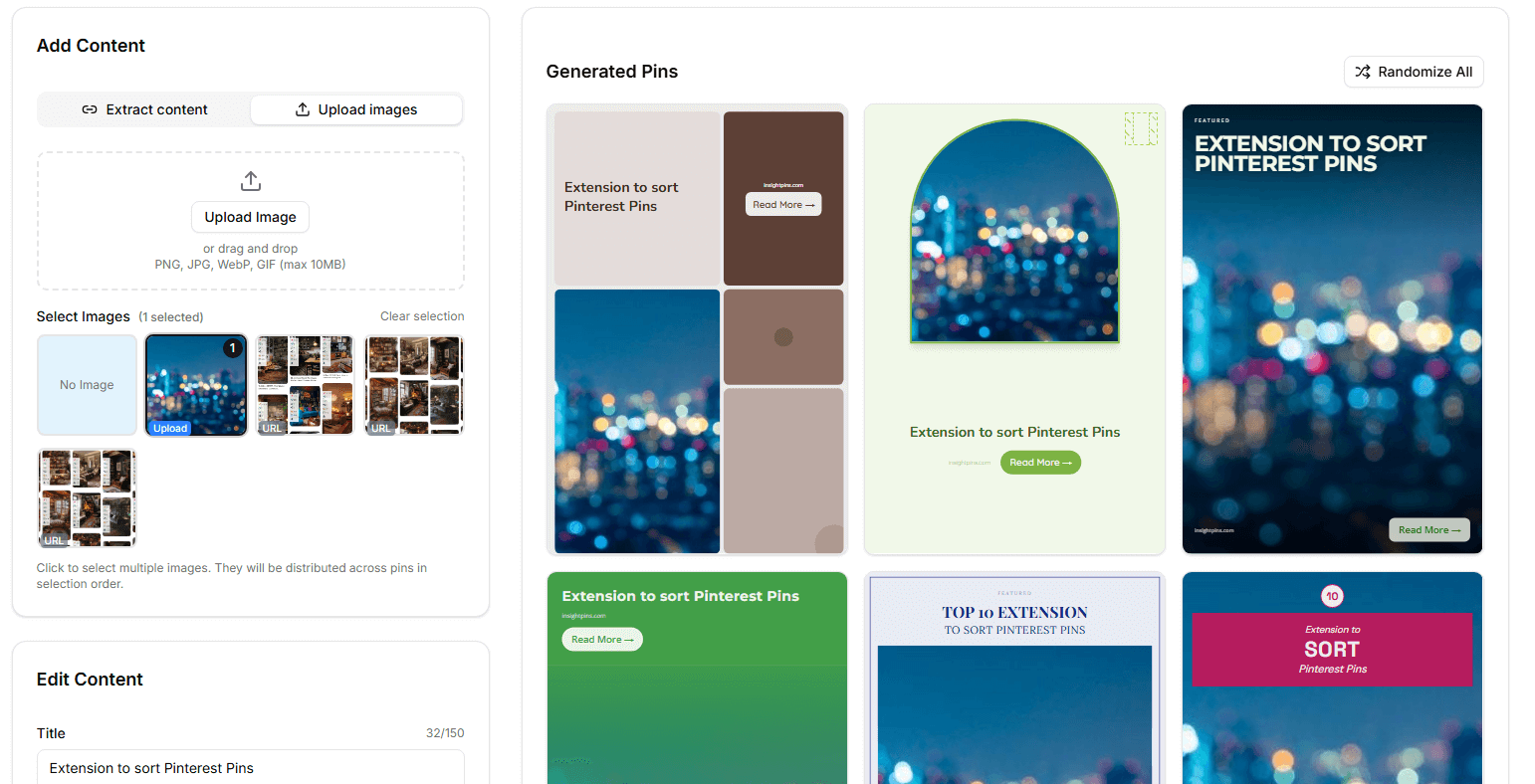
The second tool in the InsightPins ecosystem is their Free Pinterest Pin Generator, available at app.insightpins.com. This is a web-based tool that lets you create professional-looking Pinterest pins from any URL – completely free, with no account required.
How the Pin Generator Works
The workflow is dead simple. Paste any blog post, product page, or recipe URL into the tool. It automatically extracts the title, description, and images from the page. Then you customize the design using one of 10+ professional templates, pick from 15 curated color palettes, choose your fonts, and optionally add a CTA button and your website name. The tool generates multiple pin variations instantly, which you can download as high-quality PNG files (1000x1500px, the optimal 2:3 ratio for Pinterest).
Why This Matters for Content Creators
Creating Pinterest pins has always been a bottleneck. Most bloggers either spend 20-30 minutes per pin in Canva, or they pay a designer. The InsightPins generator eliminates this friction entirely. You paste a URL, tweak a few settings, and get six different pin designs ready to download – all in under a minute.
The templates cover the most popular content types: blog posts, product pages, recipes, quotes, and listicles. Each template is designed with Pinterest best practices in mind – bold typography, clear hierarchy, and colors that pop in the feed. The fact that you get multiple variations from a single URL means you can A/B test different designs to see which drives more clicks.
What Makes It Stand Out
There are other pin generators on the market – PinGenerator.com and PinMaker are probably the best known. However, most of them require account creation, charge for basic features, or have clunky interfaces. The InsightPins generator requires no signup, has no watermarks, and exports clean images you can use anywhere. It’s genuinely free with no hidden catches.
Putting It All Together: A Complete Pinterest Workflow
What makes the InsightPins toolkit particularly effective is how the two tools complement each other. Here’s the workflow I’ve been using:
Step 1: Research. Use the Chrome extension to browse Pinterest in your niche. Sort pins by saves and engagement to identify what content formats and visual styles perform best. Note the common elements – color schemes, text overlays, pin dimensions.
Step 2: Create. Take your blog post or product URL and run it through the Pin Generator. Apply the design patterns you observed in Step 1 – choose templates and colors that match what’s already working in your niche.
Step 3: Analyze. After publishing your pins, use the extension to track how they perform compared to competitors. Export data to CSV for monthly reporting, and iterate on your design choices based on what the numbers tell you.
This research-create-analyze loop is the foundation of any successful Pinterest strategy. Having both tools from the same provider ensures a smooth, integrated experience.
Who Should Use InsightPins?
The toolkit is versatile enough for different user types. Bloggers benefit the most from competitor analysis and quick pin creation – two tasks that usually eat up hours every week. E-commerce sellers can use the extension to research trending product pins and the generator to create optimized pins for their stores. Pinterest managers and agencies will appreciate the CSV export and multi-device licensing for team workflows.
Even if you’re just starting with Pinterest, the free tier of the extension combined with the free pin generator gives you everything you need to build a data-informed strategy from day one – without spending a cent.
Final Verdict
InsightPins fills a real gap in the Pinterest marketing ecosystem. The Chrome extension delivers analytics that Pinterest itself should probably offer natively, and the pin generator removes the most tedious part of content creation. Together, they form a lightweight but powerful toolkit that punches well above its price point.
If you’re serious about Pinterest growth – whether for a personal blog, an online store, or client campaigns – these tools are worth adding to your arsenal. Start with the free versions, and if you find yourself relying on them daily (as I did), the Pro upgrade is one of the most affordable investments you can make in your Pinterest workflow.
Try the extension: Pinterest Pin Stats – Sort Pins on Chrome Web Store
Try the pin generator: app.insightpins.com
Learn more: insightpins.com
Leave a Comment